

 Our themes offer 3 different Site-Wide Layout options that can be loaded with one click:
- 3 Column Layout – Left & Right Sidebars, One Column (center)
- 2 Column Layout – Left Sidebar, One Column (right)
- 2 Column Layout – Right Sidebar, One Column (left)
Each theme also offers one custom Page layout option (only for Pages, not Posts) for you to select from when creating a Page. This one is particularly useful when you want to display something large without sidebars in the way!
- One Column, No Sidebars
Should I use Posts or Pages? This is a common question, so we wanted to answer it here breifly.
Site-Wide Layout Options
3 Column Layout
Ideal for sites where sidebar space is at a premium. The 3 column layout displays the header menu and Featured Post Area, a left and a right sidebar, and the blog roll down the center. The sidebars are sized to allow display of a number of standard IAC ad sizes in each sidebar, and plenty of room for custom navigation menus.
| FIG A: 3 Column Layout |
 |
Left Sidebar, One Column Layout
The left sidebar, one column layout displays the header menu and Featured Post Area, along with only a left side bar, and a wider single column to the right for the body of the page.
| FIG B: 2 Column Layout – Left sidebar, One Column |
 |
Right Sidebar, One Column Layout
The right sidebar, one column page template displays the header menu and Featured Post Area, along with only a right side bar, and a wider single column to the left for the body of the page.
| FIG C: Right Sidebar, One Column |
 |
Page Template Options
To use this Page template, create a new Page or edit an existing one. Then under the Page Attributes controls, using the Templates drop down, select “One Column, No Sidebars”. Click UPDATE to save your Page.
| FIG D: Page Template controls |
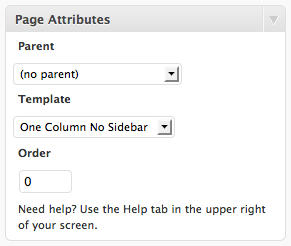 |
| FIG E: One Column, No Sidebars Page Template |
 |
Do I Use Pages or Posts?
Pages are optimal in WordPress for displaying content in a specific and custom way that is unique from other pages, or can’t be done as well in the format of a Post. Pages also do not get displayed in your blog roll – perfect for things like your About Us, Contact, Support or other static content areas.
Posts are optimal in WordPress for conveying information that you want to have show up in your home page blog roll, like Travel Event announcements, new Trip Posts you want your readers to find and new blog posts or features you want to launch.
Feature Tour
<< Theme Skins BACK I NEXT Header and Background >>




Hi,
I try to pur the Right Sidebar, One Column Layout
just with a click and it doesn’t work , it always come back with two columns. Could you please explain to me how to do.
Thanks a lot
Hell Barbe,
Are you changing the layout by going under APPEARANCES > THEME LAYOUT & SKINS, or are you trying to use a Page template? The layout of the site is controlled in the former area. Go to APPEARANCES > THEME LAYOUT & SKINS and click on the two column layout you want under the “Theme Grid” area, then SAVE CHANGES at the bottom. Then view your site. You may need to hold down SHIFT+REFRESH to clear your browser’s cache in order to see the changes.
Hi,
very nice Theme, how can i change the width of the theme or sidebars?
THKS
UA
Hi Utku, you cannot at this time change the width of the overall layout, and the sidebars are currently fixed to two different widths depending on which layout (2 or 3 column) you use. You could edit the CSS yourself, but we have not supplied editable controls for this in the admin area. However, we will add this suggestion to the list of proposed changes and improvements to the next update. Thanks!
Hi,
first thanks for this great template including the greats widgets. When you edit the functionality of setting the width, it would also be great to have an option for a flexible width of the main column, where the posts are displayed. Is this possible?
cheers, Ulrich
Hi Ulrich, that is a good suggestion. We will look into whether or not adding that is possible in a near future update.
I just downloaded this template. How exactly do you get rid of the ‘Calendar’ ‘Archives’ and ‘Meta’ sections of the pages?
Those are widgets. You need to go to APPEARANCE > WIDGETS and pull them out of the sidebars.